
A listing photo used to show what the camera saw on the day of the shoot, plus some careful cleanup. That's no longer a safe assumption. With current AI tools, an editor can turn a noon exterior into dusk, furnish an empty room, put snow on an October lawn or repaint a basement in the time it takes to upload the file. For agents in Northern Virginia, Maryland and DC, that opens up real marketing options. It also makes it easier to mislead a buyer without meaning to.
The examples below all come from one listing: a brick-front colonial in Haymarket, in western Prince William County, photographed vacant in late October with the neighborhood at peak fall color. The original photos are real. Every edited version was made with AI and is labeled as such.
1. Everyday AI Editing, Briefly
A lot of AI editing never draws attention, and it shouldn't. Many photographers now use AI-assisted software for routine corrections: balancing color, recovering window views, straightening walls and removing lens distortion. Others still do that work by hand, blending bracketed exposures themselves. How much AI is involved, and where, varies widely from one photographer to the next.
What these corrections have in common is that they fix the photo, not the property. The room in the finished image is the room a buyer walks into. The edits worth a closer look are the ones that change what the buyer sees.
2. What AI Changed About Advanced Edits
Twilight conversions, virtual staging and sky replacement aren't new. For years they were built by hand in Photoshop, one layer at a time, and the result depended heavily on who did the work and how much time they had. A rushed virtual twilight could leave a halo around the roofline or windows glowing in the wrong places. Staged furniture often floated a few inches off the floor or was sized for a different room.
AI has made these edits faster, cheaper and far more consistent. Light falls the same way across every frame in a set, shadows land under furniture where they should, and a dozen exteriors can be converted in the time one used to take. That consistency is a real improvement for listings. It's also why disclosure matters more now than it did when these edits were rare and usually easy to spot.
3. Changing the Conditions: Twilight, Weather, Season and Lawn
The first group of advanced edits changes when the photo appears to have been taken, without touching the house itself.
Virtual twilight turns a daytime exterior into a dusk scene: a deep blue sky with color at the horizon, warm light in the windows, the landscape lighting on. Real twilight photography means a second trip timed to a short window after sunset, and for an aerial it means flying in fading light. The AI version needs only the daytime frame.
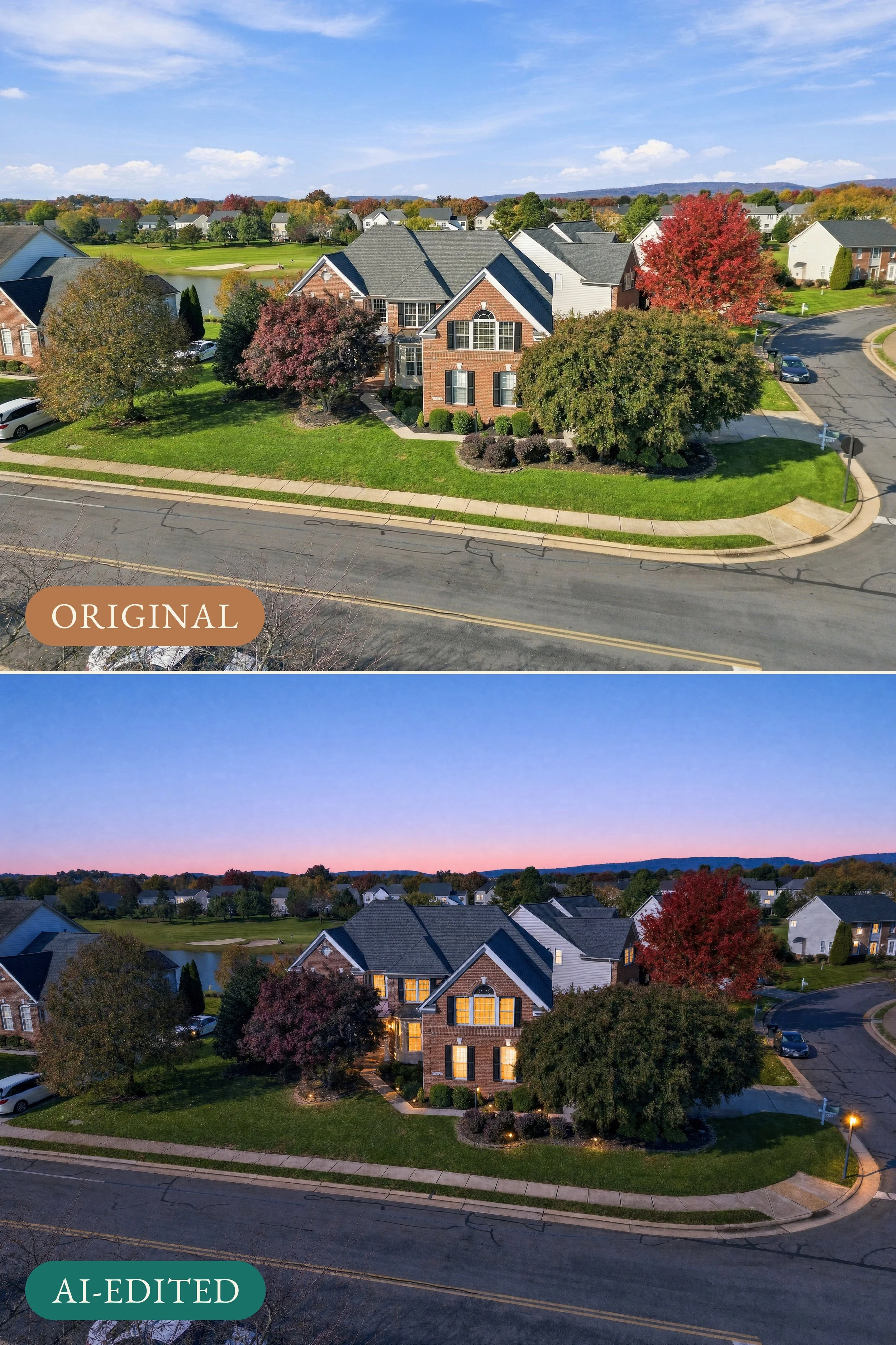
AI-edited example: the original daytime aerial (top) and a virtual twilight version (bottom).
Weather changes swap the sky and the light. The usual use is turning a gray day into a blue one, but the tools work in either direction. The pair below goes the other way, from a bright fall afternoon to an overcast, rain-wet one, to show how completely the mood of an exterior can change while the house stays the same.
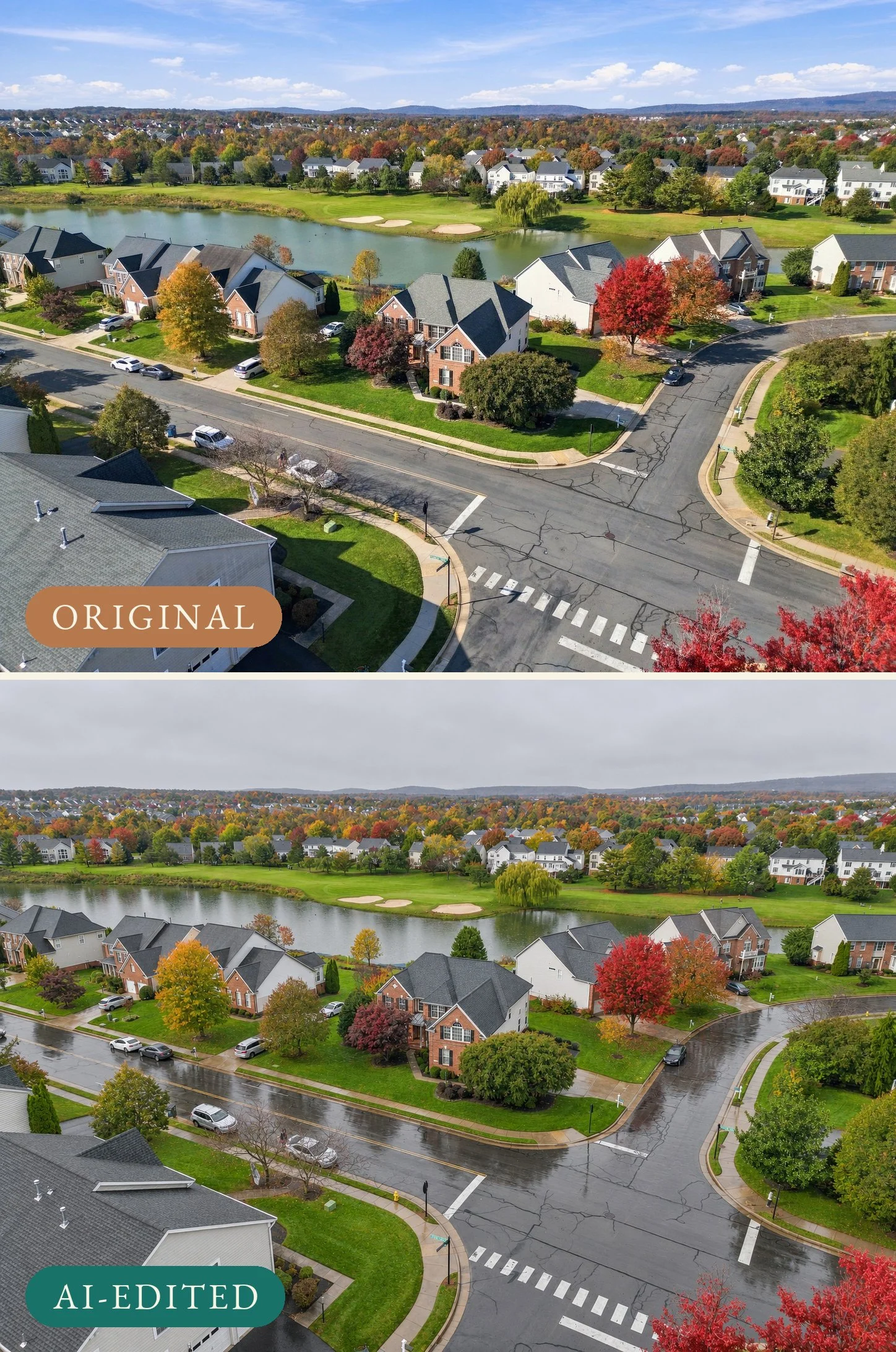
AI-edited example: the original sunny aerial (top) and the same frame edited to an overcast, wet afternoon (bottom).
Season changes go further. An edit can take the leaves off the trees and put snow on the roof and lawn in a photo taken in October. In the DMV, where a listing photographed at peak color can still be on the market after the first snow, it's an easy edit to want. Of the edits in this group, it's the most likely to mislead, because it shows a yard that won't look that way when a buyer arrives.
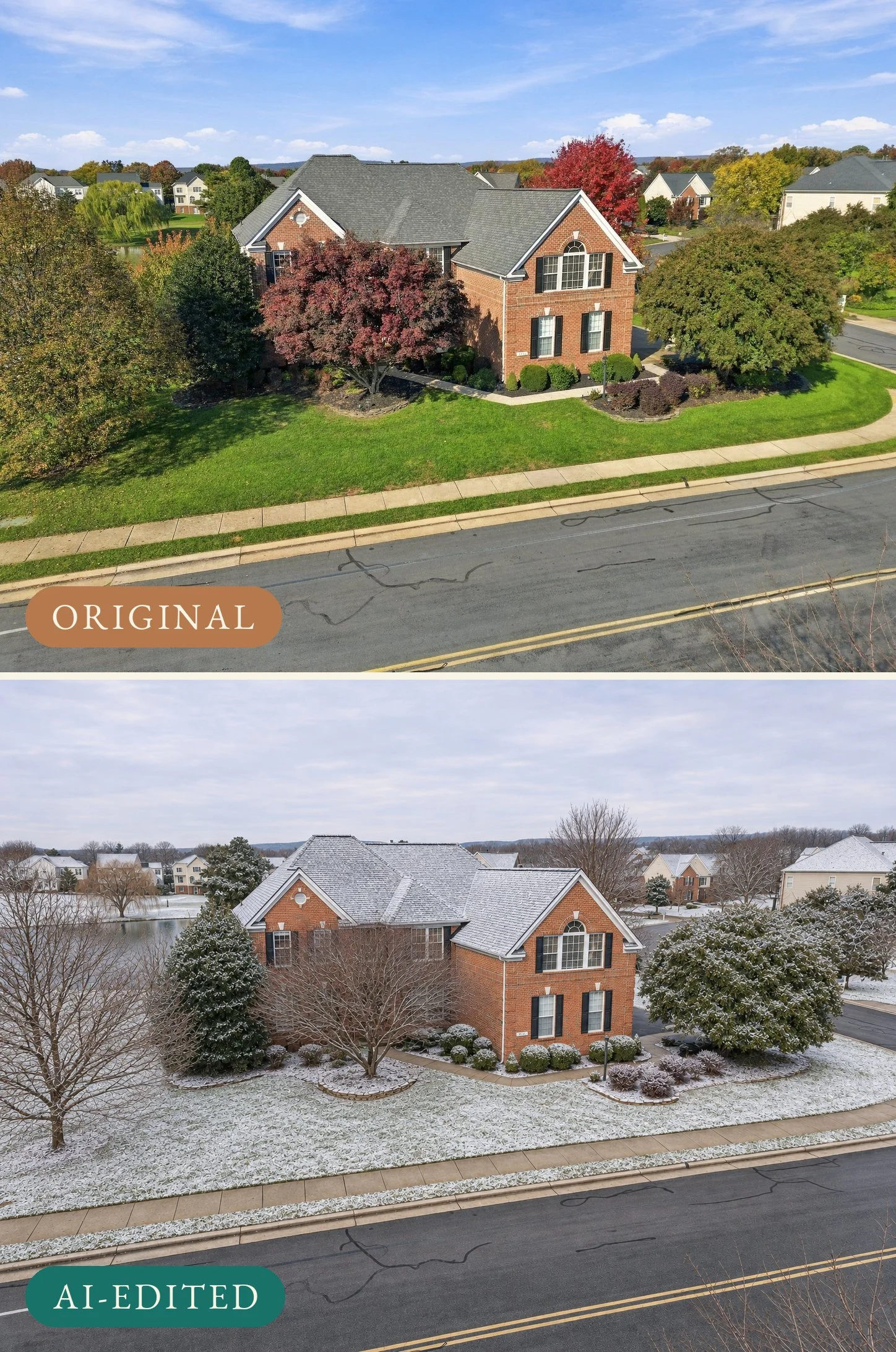
AI-edited example: the original October exterior (top) and the same frame edited to show a light snowfall (bottom).
Lawn cleanup is the mildest edit in this group. Fall shoots come with fallen leaves and the odd thin patch, and AI can clear the leaves and even out the green in seconds. It's still worth a label, because the lawn in the photo is the lawn a buyer expects to see.
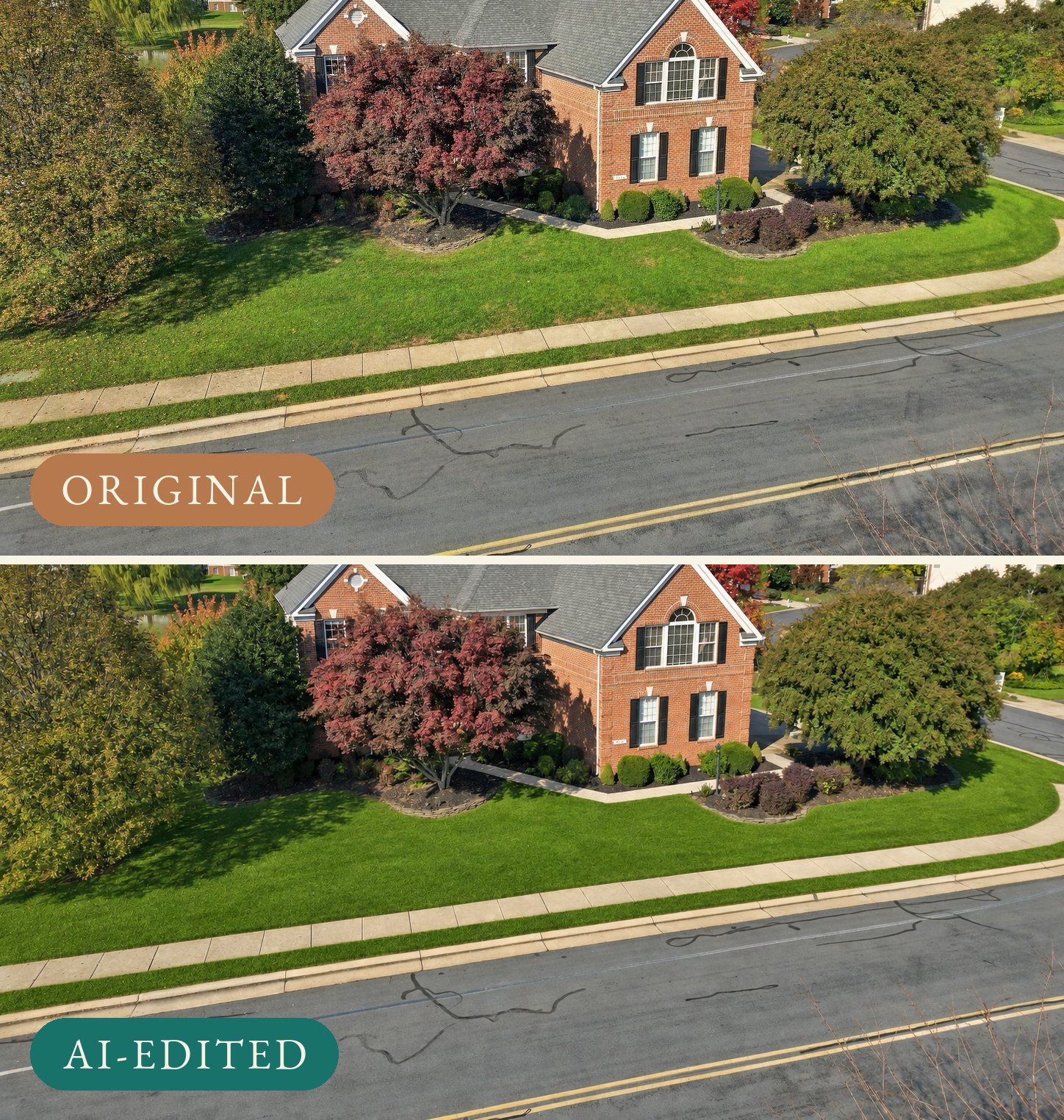
AI-edited example: the front lawn as photographed, with fallen leaves and uneven patches (top), and after an AI lawn cleanup (bottom).
4. Changing the House: Virtual Staging, Virtual Renovation and Generated Views
The second group changes what's in the photo, not only the conditions around it.
Virtual staging furnishes an empty room. On a vacant listing like this one it does real work: a two-story family room with nothing in it gives buyers no sense of where a sectional goes or how a seating area sits around the fireplace, and staged furniture answers that for a fraction of what physical staging costs. The trade-off is that the furniture isn't there. A buyer who falls for the room in the photo will walk into an empty one.
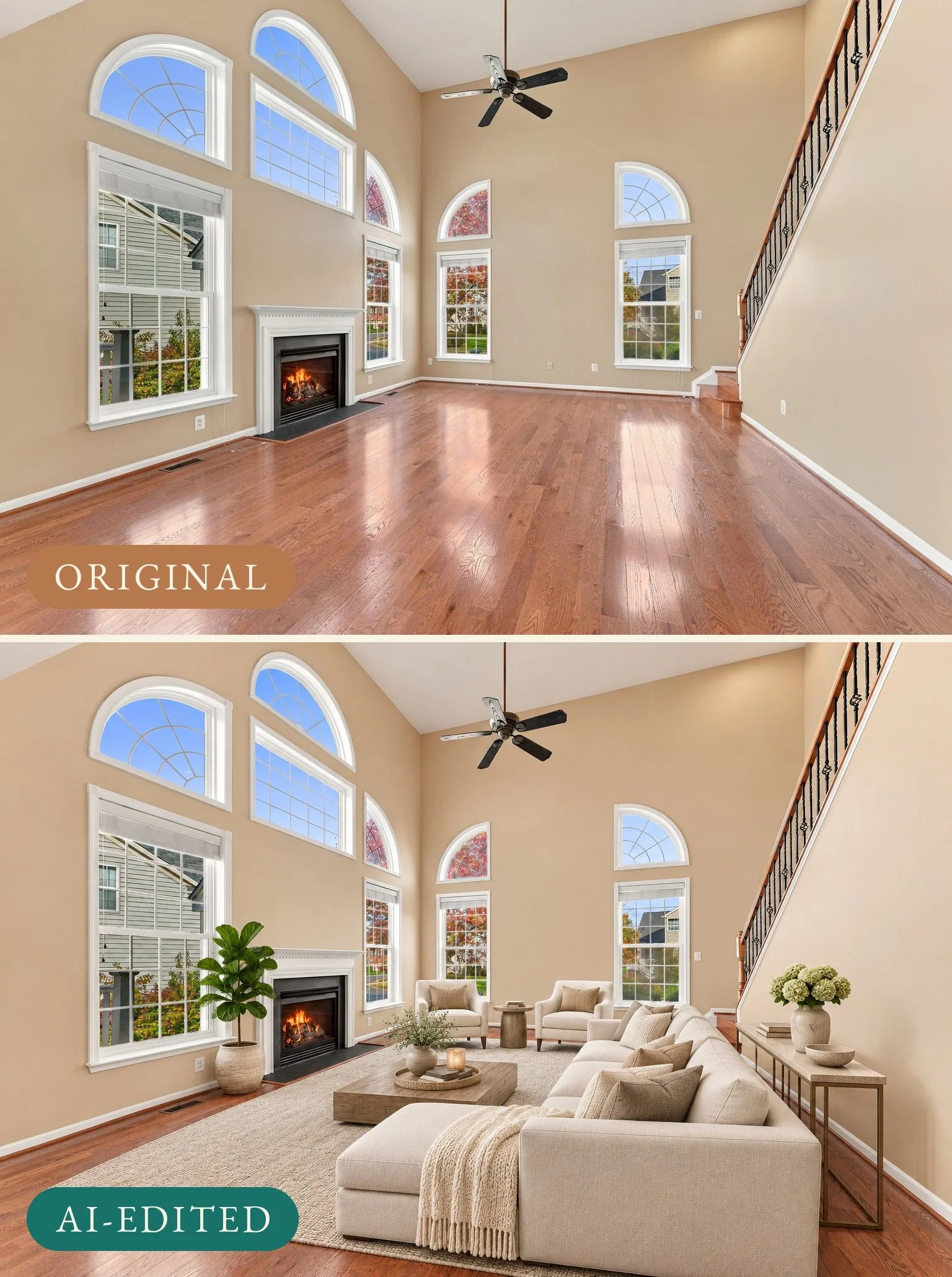
AI-edited example: the empty family room as photographed (top) and virtually staged (bottom).
Virtual renovation goes a step further and changes the house itself: new paint, new flooring, a different kitchen, a wall taken out. It can be a useful way to show buyers what a room could become. The red walls in this home's lower level are a good example of a room buyers might mentally write off, and a repaint with new flooring makes the potential easy to see. Used as the main photo of that room, though, it shows a room that doesn't exist.
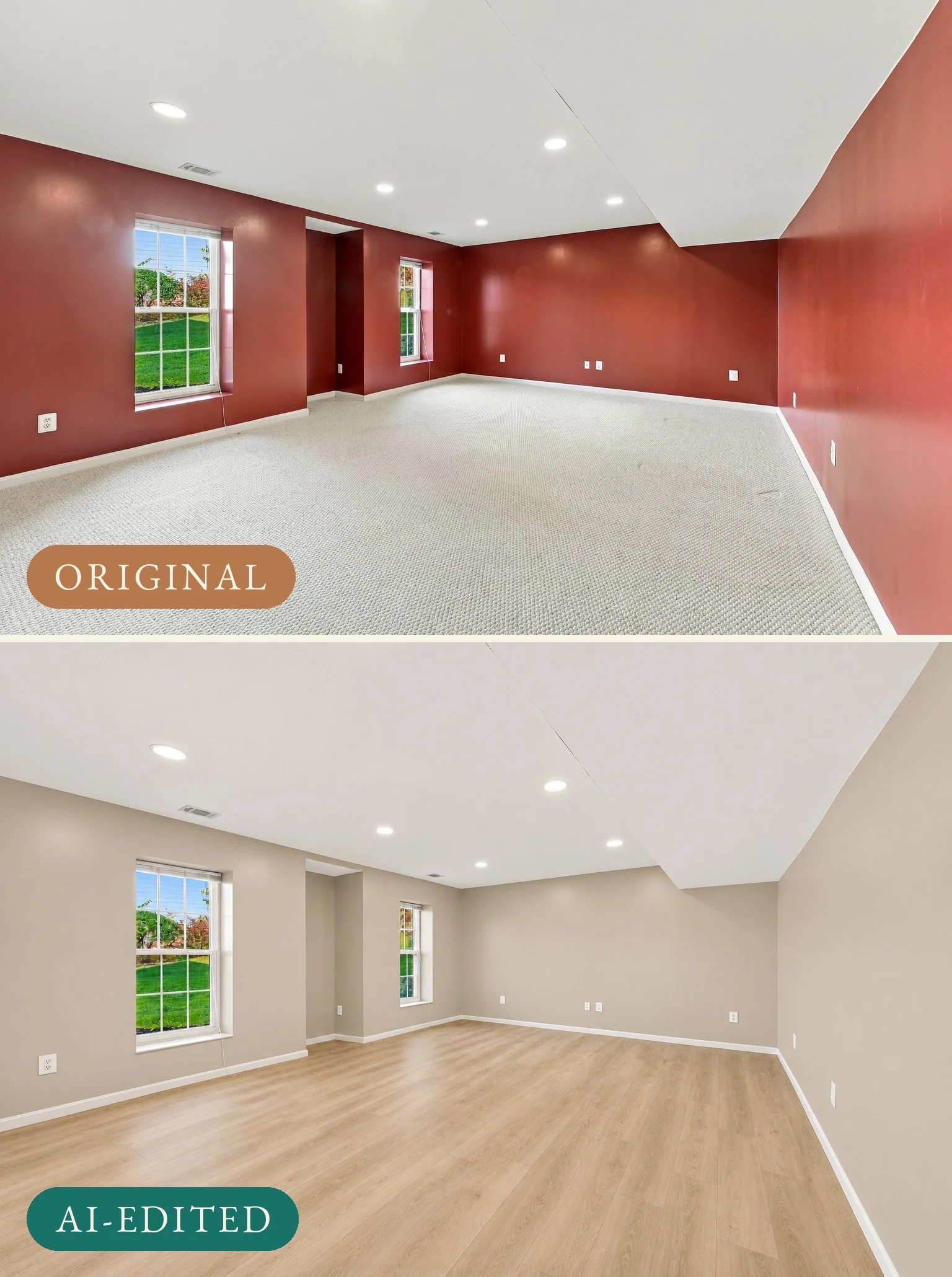
AI-edited example: the lower-level room as photographed, with red walls and carpet (top), and a virtual renovation with neutral paint and plank flooring (bottom).
Generated views are the newest version of this. Every front exterior of this home was shot from the air, and an AI tool can turn one of those drone frames into a street-level front view that no camera ever took. The result can look exactly like a ground-level photo. But the tool has to work out everything the drone didn't see, including the parts of the entry hidden behind the large tree in the original, and the result shows its reconstruction of those details, not a photograph of them.
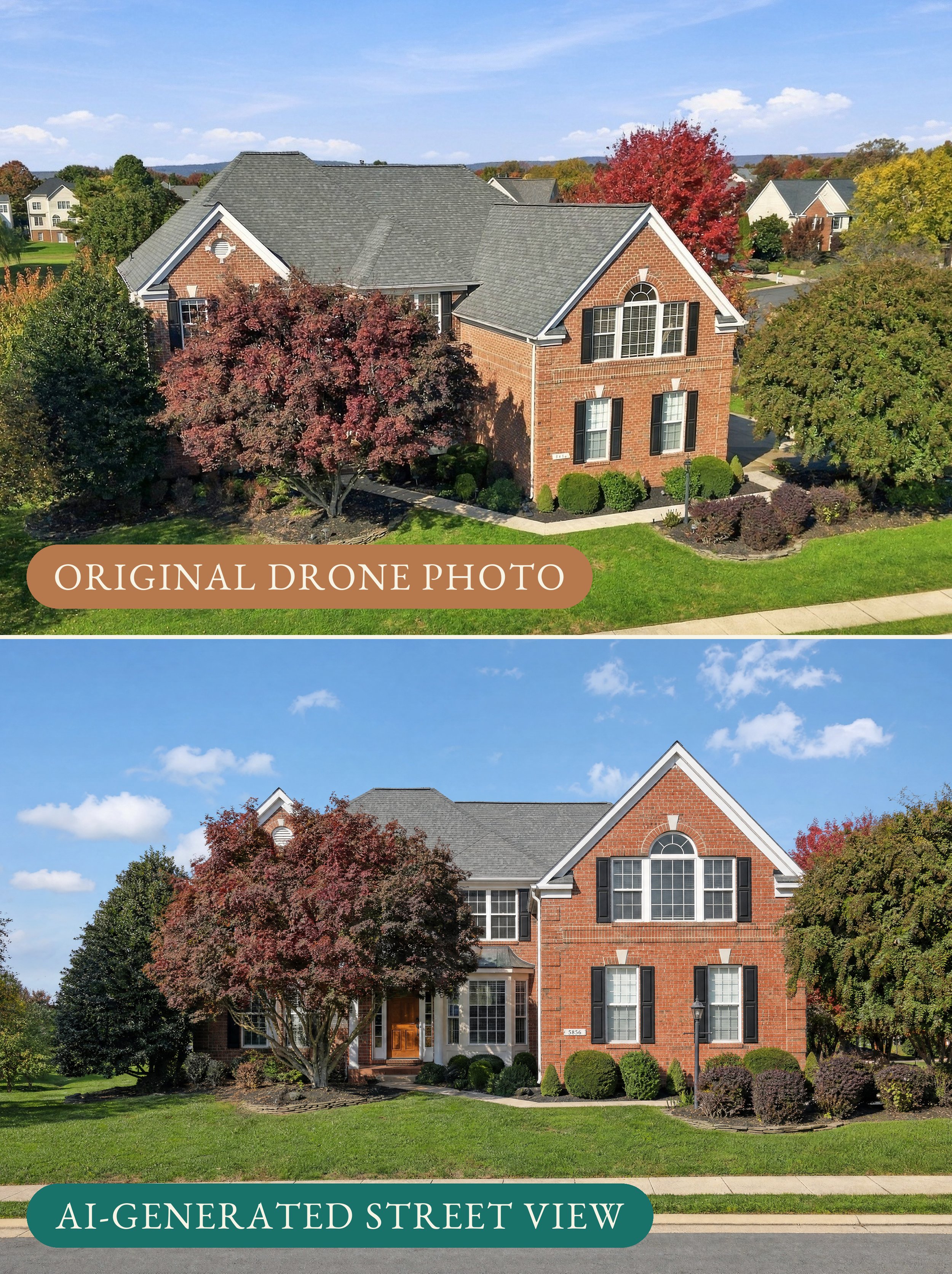
AI-generated example: the original drone frame (top) and a street-level view generated from it (bottom).
5. Where AI Still Gets It Wrong
AI edits are consistent, not infallible. General-purpose image tools in particular tend to "improve" things they were told to leave alone, and the changes are easy to miss at a glance. Both of the examples below came out of the edits made for this post.
The first attempt at the lawn cleanup was told to touch nothing but the grass. It cleared the leaves, and it also turned the louvered round vent in the front gable into a blank white disc and softened the brick around it. At full size the house still looks right. Zoomed in, it's no longer the same vent.

Detail from a rejected AI lawn edit (right): the louvered gable vent became a blank disc.
The winter version had a harder problem. Once the AI took the leaves off the large tree in front of the house, it had to show what the tree had been hiding, so it filled in that part of the facade itself, including a shuttered second-floor window the original photo never shows. That's what any season change does to a heavily landscaped front: everything behind the foliage is the AI's guess.
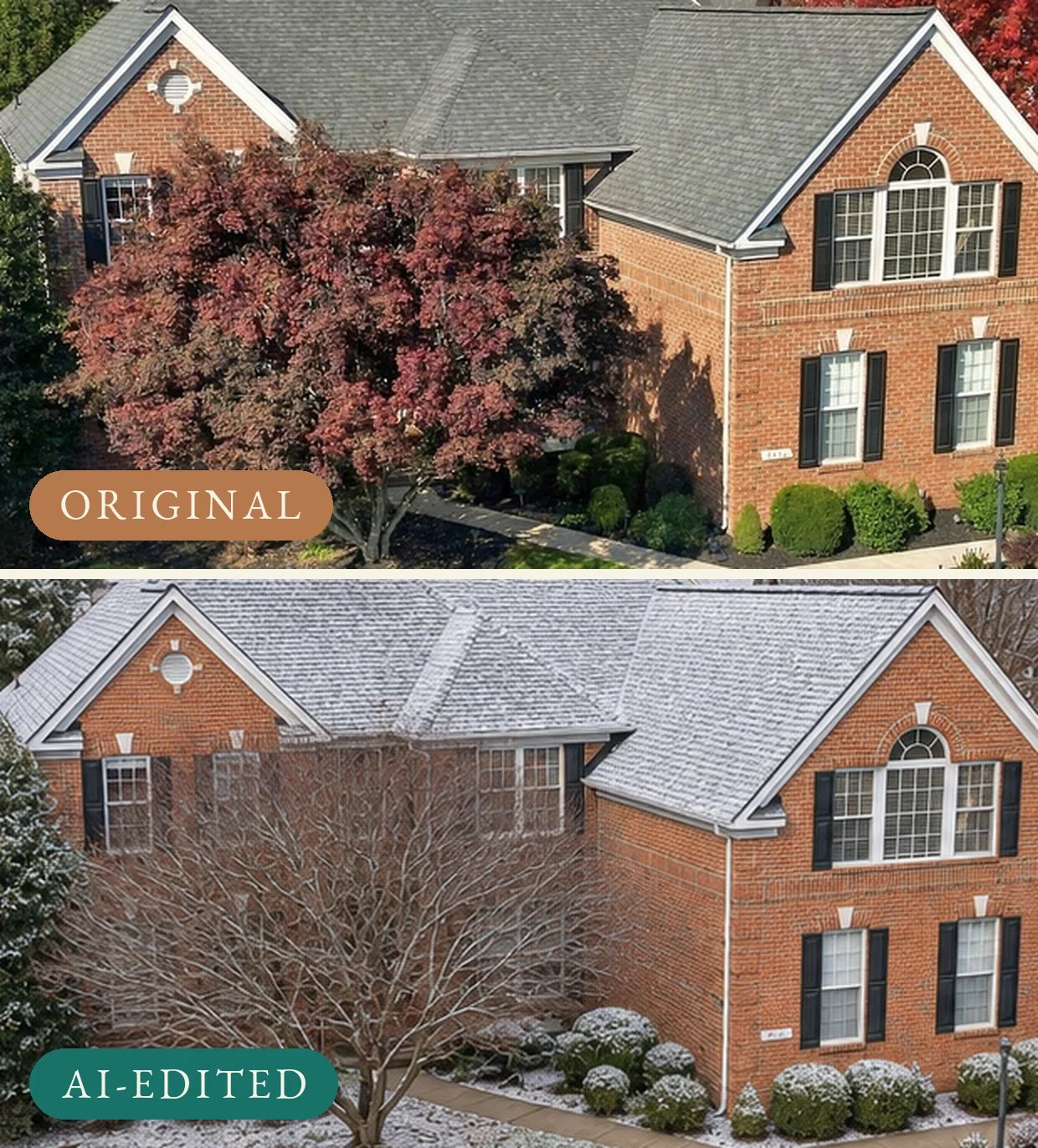
Detail from the AI winter edit (bottom): with the leaves gone, the tool filled in the facade behind the tree, including a window the original never shows.
Those are the patterns to watch for in any AI edit: features added or removed, windows and doors that change shape, landscaping that grows or moves, and furniture sized for a different room. Every AI edit needs someone to compare it against the original before it goes out, and the question isn't only "does it look good?" but "is this still the same house?"
6. What Has to Be Disclosed
A simple way to sort AI edits is by what they change.
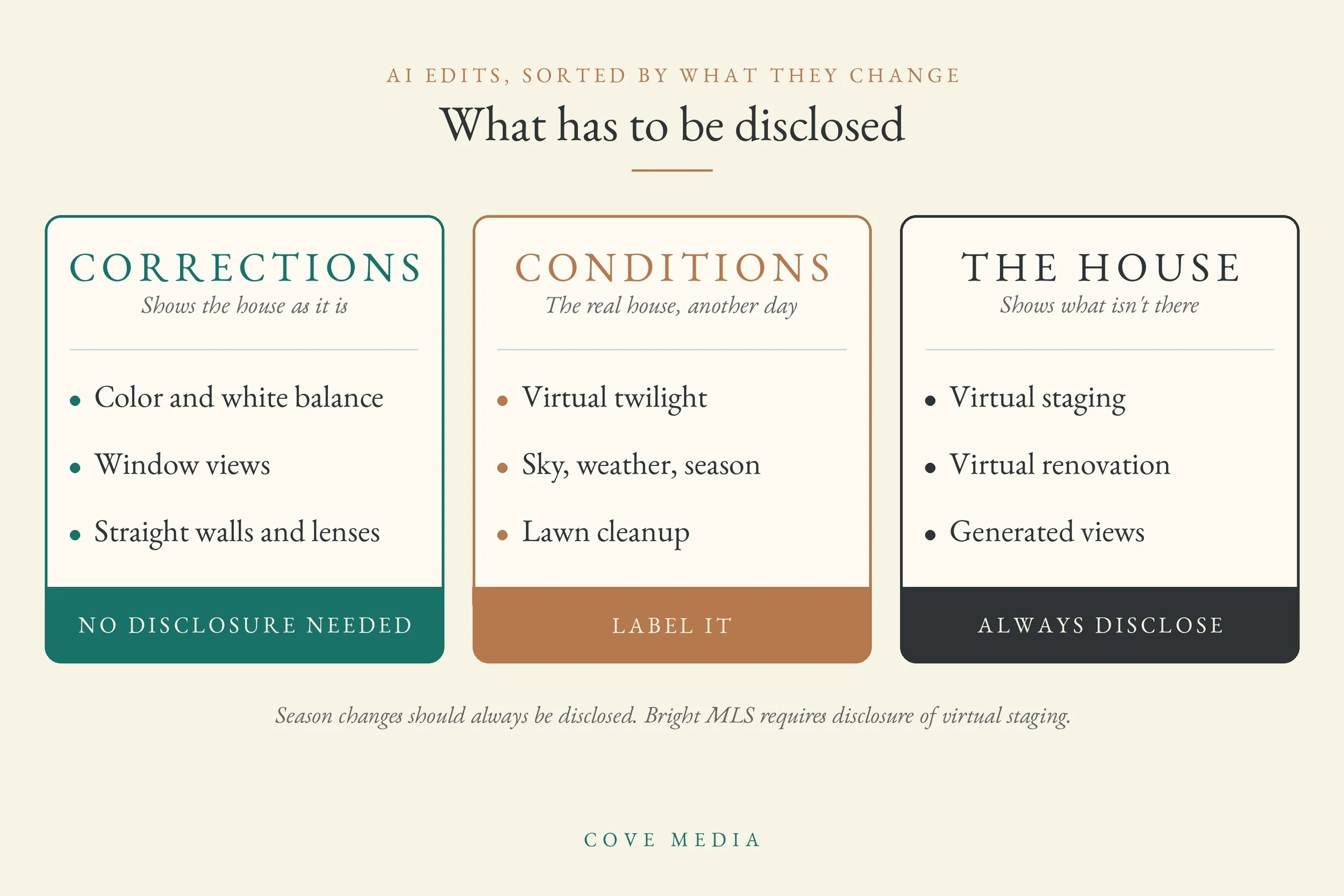
Corrections (color, window views, straight walls, lens distortion) show the property as it is. They don't need a disclosure.
Changes to the conditions (twilight, sky, weather, season, lawn cleanup) show the real house at a time or in conditions it wasn't photographed in. A twilight, sky or lawn edit is best labeled in the caption or the listing remarks. A season change should always be disclosed, because the yard a buyer sees in person won't match.
Changes to the house (virtual staging, virtual renovation, generated views) show something that isn't there or was never photographed. These always need a disclosure. Bright MLS, which serves most of the DMV, requires virtually staged photos to be disclosed in the MLS. The NAR Code of Ethics points the same way: Article 12 requires REALTORS® to present a true picture in their advertising, and Standard of Practice 12-10 specifically prohibits the use of misleading images.
Lawmakers are starting to write this down. California's AB 723, in effect since January 1, 2026, requires a listing ad that uses a digitally altered image to say so on or next to the image and to link to the unaltered original. It excludes routine adjustments like lighting, white balance, color correction and straightening. Closer to home, a bill introduced in the DC Council on October 9, 2026 (B26-0858) would require any DC sale or rental listing that uses a digitally altered image to carry a clear disclosure, a written description of how the image differs from the property, and access to the unedited version. It's still under committee review, but it's worth watching for anyone who lists in the District.
A practical habit covers most of this: when a staged or renovated image goes into the gallery, put the original right beside it. And the test from an earlier post on how real estate photos get edited still holds: if a buyer walked in with the photo in hand, would they recognize the house?
7. What This Means for Your Next Listing
AI editing is now a normal part of listing marketing, and used well, it makes listings better. A few habits keep it on the right side of the line:
Ask what was edited. Know which images were changed beyond routine correction, and how.
Keep the originals. Hold on to the unedited version of every altered photo, and include it in the gallery for staged or renovated rooms.
Label before you upload. Note "virtually staged," "virtually renovated" or "AI-generated view" on the image or in its caption, and disclose staging in the MLS as Bright requires. Flag season changes the same way.
Compare before you publish. Put each AI edit next to its original and check the windows, doors, fixtures and landscaping.
For when real dusk photography is worth it versus a converted daytime frame, see the guide to twilight real estate photography. For how staging options compare, see virtual staging vs. traditional staging. For listings across DC, Maryland and Northern Virginia, Cove Media's packages and pricing are a good place to start.