
How to Prepare Your Listing for Real Estate Photography in the DC Metro Area
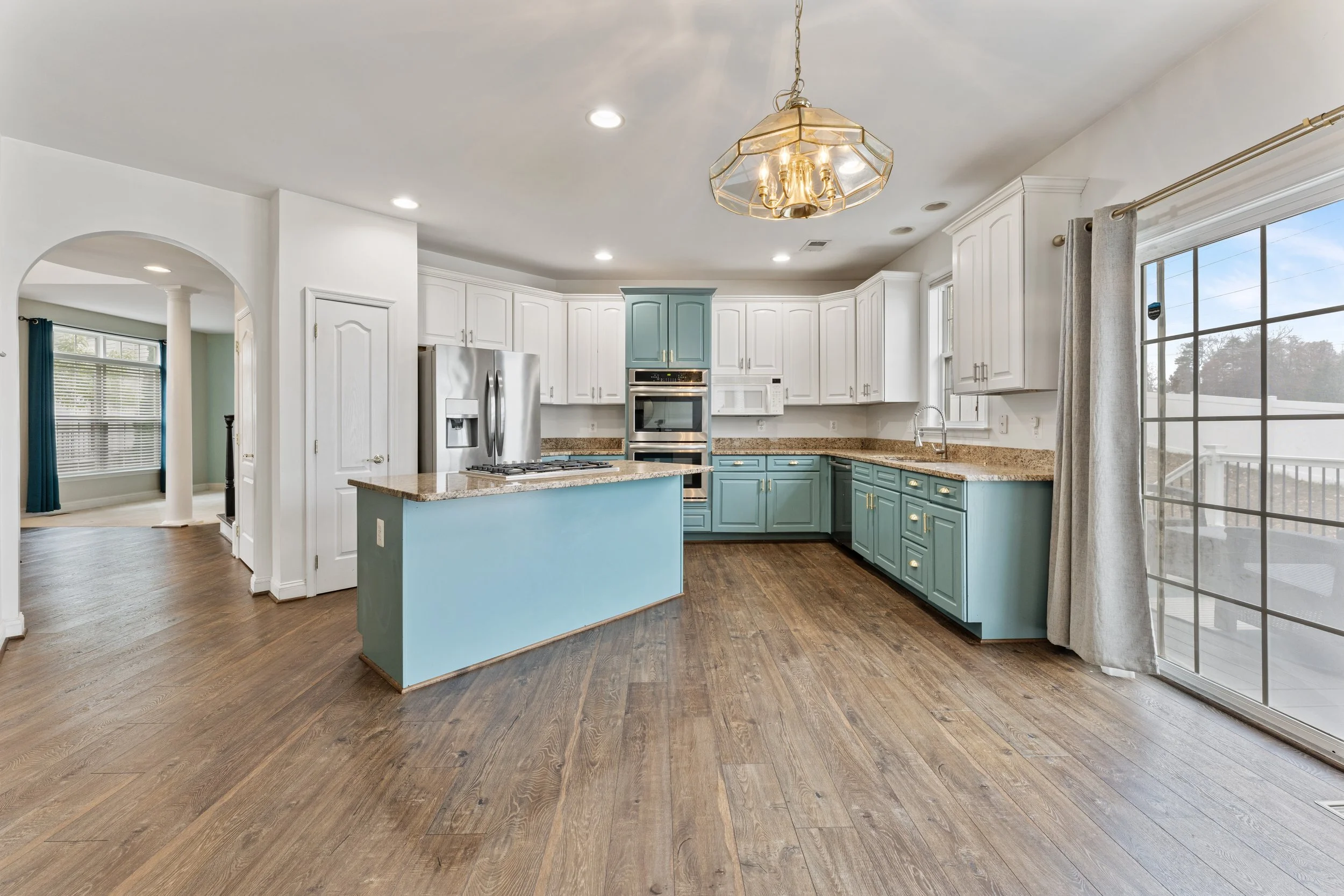
You've booked the shoot. The photographer is arriving tomorrow morning. This is the walk-through to do tonight — room by room, in the order a photographer moves through a house.
How a home is prepared before shoot day makes an enormous difference in the final results — and it's one of the most consistently overlooked parts of the listing process. Even the best photographer in Northern Virginia can't make a cluttered countertop or an unmade bed look good. Great listing photos start before the photographer ever walks through the door.
This guide expands on Cove Media's Getting Ready Guide — the same prep checklist we send to every client before a shoot — with added context and room-by-room detail to help you get the most out of your session.
The Most Important Thing to Know
Before anything else, one policy worth understanding: Cove Media operates on a "shoot as is" approach to keep shoots running on schedule. Our photographers are happy to handle small adjustments — opening blinds, turning on lights, closing toilet seats — but they don't make beds, move furniture, handle pets, or clear personal items. That work needs to happen before we arrive.
The short version, straight from our Getting Ready Guide: anything you can see, the camera can see.
That one principle covers most of what you need to know. If something would catch your eye during a showing, it'll catch the camera's eye too.
General Prep: The Foundation
Cove Media's Getting Ready Guide lays out four rules that apply to every room in the house:
1. Thoroughly clean the entire property. That means vacuuming, mopping, and wiping down windows — not just a quick tidy. Dust, smudges, and dirty floors are all visible in photos.
2. Turn on all the lights and open all the blinds. Every light in the house should be on when the photographer arrives — overheads, lamps, under-cabinet lights, closet lights, all of it. Natural light is your best asset. Don't block it with closed blinds or curtains.
3. Turn off all ceiling fans, TVs, and computer screens. Ceiling fans blur in photos. TVs and monitors create distracting reflections and glare. All of them should be off before the photographer walks in.
4. Make all beds, clear all countertops, and put shoes and jackets away. These three things alone account for the majority of last-minute prep issues on shoot day. Handle them the night before.
Not every listing can be emptied. If the sellers are still living there and moving furniture out is not realistic, digital decluttering covers what physical prep cannot — how to get listing photos when you still live there works through that case in detail.
Room-by-Room Checklist
Exterior
The exterior shot is almost always the MLS cover photo — the first image a buyer sees. Per Cove Media's Getting Ready Guide, the front yard is where the first impression is made, and anything that wouldn't look great on camera should be moved out of sight.
Front yard checklist: Close the garage door. Remove all vehicles from the garage, driveway, and the street directly in front of the home. Make sure landscaping is neat and the lawn is freshly mowed. Sweep debris off the driveway and front walkway. Move water hoses out of sight. Hide or relocate trash cans and recycling bins.
Front entry: Clean the front door. Replace any burned-out porch lights. A fresh doormat goes a long way. If there are potted plants at the entry, remove any dead ones and water the rest.
Backyard: Keep the yard well-maintained and the porch free of leaves and debris. Arrange outdoor furniture neatly. If there's a pool, remove the cover and make sure the water is clear — turn off jets and water features, and keep pool lights on.
If the grass is patchy or the lawn isn't at its best, ask about grass replacement editing — it's one of Cove Media's most popular editing add-ons and an easy fix for a common problem.
Kitchen
The kitchen is typically one of the most photographed and most scrutinized rooms in any listing.
Countertops: Clear everything. Knife blocks, coffee makers, toasters, mail, fruit bowls, paper towels, dish soap, sponges — all of it. This is called out specifically in the Getting Ready Guide because it's the most common issue on shoot day. Leave at most one or two intentional decorative items if they genuinely add to the space.
Sink: Empty and clean the sink. No dishes, no dish rack, no sponge.
Appliances: Wipe down all visible appliance surfaces — stovetop, oven door, refrigerator face, dishwasher front. Remove all magnets, notes, and photos from the refrigerator.
Cabinets: Make sure all cabinet doors and drawers are fully closed and aligned.
Lighting: Replace any burned-out bulbs before shoot day. Turn on everything, including under-cabinet lighting if available.
Bedrooms
Beds: Make every bed with clean, wrinkle-free bedding — hotel-style, pulled tight, pillows arranged. Per the Getting Ready Guide, this is one of the four baseline requirements for every shoot.
Nightstands: Clear nightstands of everything except a lamp and perhaps one simple item. Remove phone chargers, glasses, books, medications, and anything personal.
Cables: Hide all visible cables — lamp cords, phone chargers, anything trailing across surfaces or floors.
Closets: Keep all closet doors closed unless the closet is a notable selling feature worth showcasing.
Lighting: Turn on all lamps and overhead lights. Match bulb color temperatures where possible — mixing warm and cool bulbs creates uneven light in photos.
Bathrooms
Bathrooms are small, high-detail spaces where clutter is immediately obvious.
Countertops: Remove everything — toothbrushes, toothpaste, hand soap, razors, makeup, hair tools. All of it. The Getting Ready Guide is specific here: clear countertops completely.
Toilet: Put the seat and lid down.
Shower and tub: Remove all shampoo, conditioner, body wash, and bath products. Clean glass doors of soap scum and water spots. Hang fresh, neatly folded towels.
Mirrors and fixtures: Clean all mirrors and chrome fixtures. Fingerprints and water spots show up clearly in photos.
Closets: Close all closet and cabinet doors.
Whole-Home Final Walkthrough
Do this the morning of the shoot before the photographer arrives:
Every light on — overheads, lamps, under-cabinet, closets. All of them.
All window treatments open fully.
All pets and pet items removed — food bowls, beds, toys, litter boxes, crates. Crate or board pets away from the property during the shoot.
All trash cans taken out — kitchen, bathrooms, bedrooms.
All personal care items cleared from surfaces.
Shoes and jackets in closets, not by the front door.
All ceiling fans off.
All TVs and computer screens off.
Everyday clutter cleared from entryway tables, kitchen counters, and coffee tables.
Why Prep Matters More in the DMV Market
Real estate photographers work fast. A standard residential shoot covers 20–40 rooms, spaces, and exterior angles in two to three hours. There's no time to rearrange furniture, track down a remote control left on the couch, or wait for a seller to finish clearing the kitchen island.
Every minute spent on-site staging or decluttering is a minute not spent on lighting, composition, and getting the angles right. When a home is properly prepped, the photographer can focus entirely on making it look its best.
In a market as competitive as DC, Northern Virginia, and Maryland — where buyers are scrolling Zillow and Bright MLS on their phones and making split-second decisions — the quality of your listing photos directly affects how fast a home sells and at what price. Prep is not optional. It's part of the job.
For Vacant Listings
Vacant homes present a different set of challenges. Empty rooms can feel cold and small in photos — buyers struggle to understand scale and have trouble imagining how a space would function.
If physical staging isn't in the budget, virtual staging is a highly cost-effective alternative. Cove Media offers virtual staging at $10 per image — a full vacant home can typically be virtually staged for $50–$100, compared to $1,500–$4,000+ for traditional physical staging in the DMV market.
For vacant homes, also confirm before the shoot: all utilities are active, all light bulbs are working, and the home has been cleaned thoroughly including windows.
Shoot Day Logistics
A few practical notes from the Getting Ready Guide worth passing along to your sellers:
Shoot times vary based on order and property size. Generally, photos, video, and 3D tours each take around 30–50 minutes to complete. Vacant properties move faster.
If you need to reschedule, do it with more than 24 hours' notice. Cove Media charges a $50 rescheduling fee for changes within 24 hours of the shoot, and $100 if the photographer arrives and can't complete the shoot due to the property not being ready.
Standard photo delivery is 24 hours. Same-day delivery is available for an additional fee if you need images back the same day as the shoot.
What Cove Media Handles on Shoot Day
Once the property is prepped, here's what you can expect:
HDR photography with exposure bracketing and blending for natural, balanced interior shots. Every order includes image enhancement — sky replacement, color correction, and brightness balancing regardless of weather on shoot day.
FAA Part 107-certified drone photography where airspace permits. This is an important caveat for DC-area listings: the National Capital Region is governed by a Special Flight Rules Area (SFRA) within a 30-nautical-mile radius of Reagan National Airport. Within that, the inner Flight Restricted Zone (FRZ) extends approximately 15 nautical miles (about 17 statute miles) from DCA — and within the FRZ, drone flight is effectively prohibited with no exceptions for commercial real estate work. Purely promotional flights, including virtual tours and listing photography, are not routinely authorized inside the FRZ. In practical terms, this means drone photography is generally not available for properties in Washington DC proper, close-in Arlington, Alexandria, and other neighborhoods that fall within the ~17-mile radius. Properties in the outer SFRA ring (15–30 nautical miles from DCA) — covering much of Fairfax County, Montgomery County, and points further out — are typically accessible with proper Part 107 authorization. If you're unsure whether your listing is eligible for drone coverage, ask when booking and we'll confirm based on the property address.
Matterport 3D virtual tours, floor plans (basic floor plan free with every order), cinematic listing video, social media reels, and virtual staging — all available individually or as part of a bundled package.
View full services or see pricing.
Ready to Book?
A well-prepped listing and a skilled photographer consistently produce results — faster sales, stronger offers, and a listing presentation that reflects well on you as the agent.
Review the full Cove Media Getting Ready Guide to share directly with your sellers, then book your shoot or reach out with any questions.
Serving the DC Metro Area
Cove Media provides real estate photography services across:
Northern Virginia: Arlington | Alexandria | McLean | Falls Church | Fairfax | Reston | Herndon | Tysons | Vienna | Oakton | Chantilly | Centreville | Woodbridge | Manassas | Leesburg | Ashburn | Sterling | Great Falls | Annandale | Springfield
Maryland: Bethesda | Rockville | Silver Spring | Chevy Chase | Potomac | Gaithersburg | Germantown | Bowie | College Park | Laurel | Takoma Park | Frederick | Annapolis
Washington DC: All neighborhoods and wards
Cove Media is a full-service real estate photography company serving the Washington DC metro area. Visit cove.media to book your next shoot or explore our services and pricing.
